
Logo v4.0
  • Preview Demo
Logo
  • Documentation
  • Introduction
  • Getting started
  • Sign Up
  • Activate
  • Activate Request
  • Product Request
  • Dashboard
  • Hierarchy
  • My Team
  • Tree View
  • Referrals
  • Profile
  • Basic Information
  • Kyc Information
  • Financial Information
  • Password
  • Transaction Password
  • Activity Log
  • Finance
  • Wallet
  • Transaction
  • Transfer Fund
  • Move Fund
  • Payout
  • Fund Request
  • Kyc
  • Business
  • Packages
  • Epin
  • Request Epin
  • Rewards
  • Notification
  • Reports
  • Binary Report
  • Level Report
  • Roi Report
  • Support
  • Tickets
  • Addon
  • News
  • Promotion
  • Authorization
  • Permission
  • Localization
  • Language
  • Settings
  • General
  • Financial
  • Package
  • Binary Income
  • Level Income
  • Direct Income
  • Reward Income
  • Registration
  • Activation
  • Payout
  • Fund
  • Seo
  • Maintenance Mode
  • Database Backup
  • Database Reset
  • GDPR Cookie
  • Custom Code
Logo v4.0
  • Documentation
  • Introduction
  • Getting started
  • Sign Up
  • Activate
  • Activate Request
  • Product Request
  • Dashboard
  • Hierarchy
  • My Team
  • Binary Tree
  • Level Tree
  • Referrals
  • Profile
  • Basic Information
  • Kyc
  • Financial Information
  • Password
  • Transaction Password
  • Activity Log
  • Finance
  • Wallet
  • Transaction
  • Transfer Fund
  • Move Fund
  • Payout
  • Fund Request
  • Epin
  • Epin
  • Request Epin
  • Achievement
  • Rewards
  • Reports
  • Binary Report
  • Level Report
  • Support
  • Tickets
  • Addon
  • News
  • Promotion
  • Popup
  • Authorization
  • Permission
  • Localization
  • Language
  • Settings
  • General
  • Financial
  • Package
  • Binary Income
  • Level Income
  • Direct Income
  • Reward Income
  • Registration
  • Activation
  • Payout
  • Fund
  • Seo
  • Maintenance Mode
  • Database Backup
  • Database Reset
  • GDPR Cookie
  • Custom Code

Password Update

Explanation of Password Update Page.
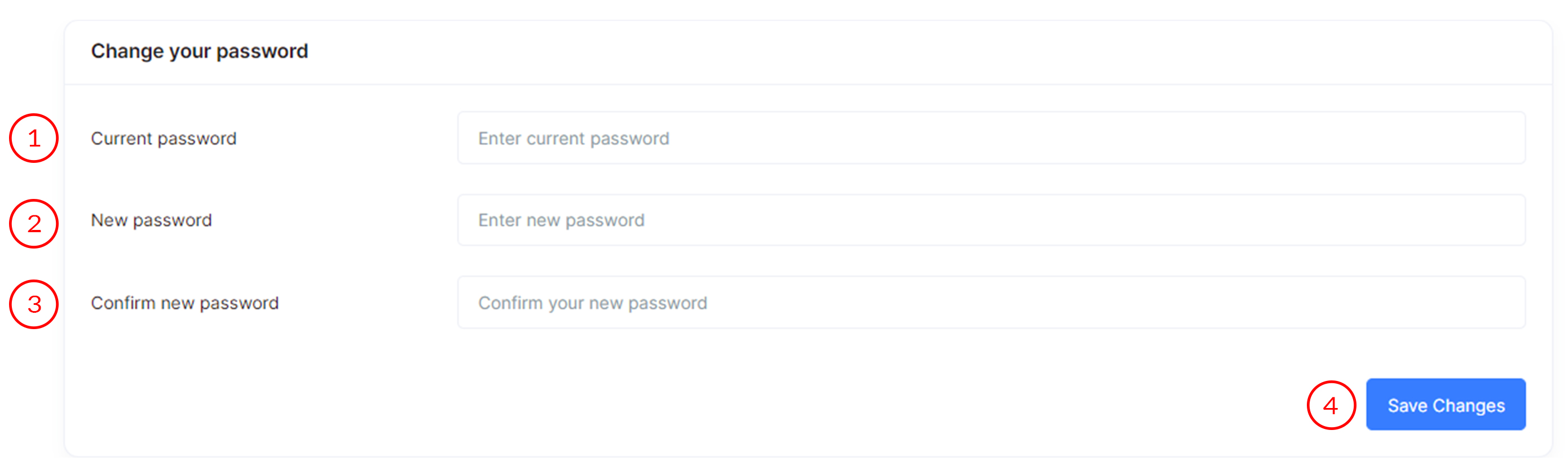
Password Update

Password Update page is used to change your account password in MLM Software.

  1. Current Password

    Enter your current password for authentication.

  2. New Password

    Set a new password for your account.

  3. Confirm New Password

    Re-enter the new password to confirm and avoid typos.

  4. Save Changes Button

    Click this button to update and save the new password.